
Download CrunchTime Counter – free, inventory tracking, food business, retail store, barcode scanner
Overview
CrunchTime Counter is a free desktop application designed to assist food businesses, restaurants, and retail outlets in managing their inventory efficiently. The software enables users to monitor stock levels, track product quantities, and maintain accurate records of inventory value. It is particularly useful for small to medium-sized operations that require a straightforward tool to streamline inventory management tasks. The application is developed by CrunchTime Information Systems Inc., a company focused on providing accessible business tools for retail and hospitality sectors.
Users can create a new account using a username and password, then begin tracking products by entering details such as product names, quantities, and associated costs. The tool supports barcode scanning for faster data entry, which helps reduce manual input errors and speeds up the inventory process. This feature is especially beneficial in fast-paced environments where time and accuracy are critical. Additionally, CrunchTime Counter allows users to monitor expenses and profits, offering a basic financial overview that supports decision-making.
Real-world use cases include daily stock checks in restaurants, periodic inventory audits in retail stores, and tracking high-turnover items in small businesses. The software’s online nature means it can be accessed from any device with an internet connection, supporting remote management and team collaboration. While the developer did not provide additional system requirements, the application appears to be built for modern web environments with minimal local processing demands.
Key Features & Capabilities
- Inventory Tracking: Users can create and manage product lists, update quantities in real time, and monitor stock levels to avoid overstocking or shortages.
- Barcode Scanning: Integrated barcode scanner functionality allows quick and accurate entry of product data, reducing manual errors and saving time during inventory checks.
- Expense and Profit Monitoring: The software tracks business expenses and calculates profit margins, helping users assess financial performance over time.
- Report Generation: Users can generate reports on inventory value, stock movement, and financial summaries for internal review or business planning.
- Multi-Device Access: As an online tool, CrunchTime Counter can be accessed from any device with a web browser and internet connection, supporting flexibility and remote management.
For example, a restaurant manager can use the barcode scanner to quickly update stock after a delivery, instantly seeing the new inventory value. A retail store owner can generate a weekly report to analyze sales trends and adjust ordering strategies. The ability to track profits alongside inventory provides a holistic view of business health. These capabilities make the software suitable for users who need a lightweight yet functional tool for day-to-day operations.
User Interface, Workflow & Performance
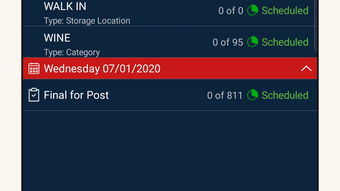
The user interface of CrunchTime Counter is designed with simplicity in mind, featuring a clean layout that prioritizes core functions like product entry, scanning, and reporting. Navigation is intuitive, allowing users to move between inventory lists, expense logs, and report dashboards with minimal clicks. The workflow follows a logical sequence: account creation, product setup, data entry via manual input or barcode, and report generation.
Based on general software behavior patterns, the application likely operates efficiently within standard web environments, with performance dependent on internet speed and browser capabilities. The developer did not specify resource usage details, so CPU and RAM behavior remain unknown. However, since the software is web-based and does not require heavy local processing, it is expected to run smoothly on most modern devices.
Stability appears to be consistent with typical cloud-based applications, though exact reliability metrics were not provided. Users may experience minor delays during peak usage times, particularly when generating complex reports. Overall, the workflow supports quick adoption, especially for users familiar with online business tools. The lack of a downloadable desktop client may affect performance in low-bandwidth settings, but the core functionality remains accessible.
Compatibility & System Requirements
CrunchTime Counter is described as an online tool accessible from any device with an internet connection. This implies compatibility with a wide range of operating systems, including Windows, macOS, and mobile platforms. However, the developer did not specify exact platform compatibility or version details.
Installation size and hardware requirements were not listed. The software does not appear to require a dedicated desktop installation, as it functions through a web browser. Therefore, system requirements are likely minimal, relying on the device’s ability to run a modern browser and maintain a stable internet connection. The developer did not provide additional details about required processor speed, RAM, or storage space.
For users seeking offline functionality, this may be a limitation, as the application depends on continuous connectivity. However, the ability to access the tool from multiple devices supports collaborative workflows and remote management. Compatibility information is limited, and users are advised to test access on their preferred devices.
Pros and Cons
Pros
- Free to use with no hidden costs
- Simple, intuitive interface suitable for non-technical users
- Barcode scanning enhances data entry speed and accuracy
- Multi-device access enables remote and team-based inventory management
- Integrated profit and expense tracking for basic financial oversight
Cons
- Exact system requirements were not specified
- No downloadable desktop version mentioned
- Performance may vary depending on internet speed
- Limited customization options for reports and workflows
- Reliance on constant internet connectivity
FAQ Section
Is CrunchTime Counter available for Windows and Mac?
CrunchTime Counter is an online tool accessible via web browser. While specific OS compatibility was not listed, it can be used on any device with internet access, including Windows and Mac computers.
Is the software secure?
The software requires a username and password for account access. While security measures were not detailed, users are advised to follow standard online safety practices, such as using strong passwords and avoiding public networks.
Can I use CrunchTime Counter without an internet connection?
As a web-based application, CrunchTime Counter requires a stable internet connection to function. Offline usage is not supported.
How often are updates released?
Update frequency was not specified. The developer has not provided information on release schedules or version history.
What type of license does CrunchTime Counter use?
The software is offered free of charge. The license type was not disclosed, but it is intended for personal and business use without cost.
Final Thoughts + CTA
CrunchTime Counter presents a practical solution for small food businesses, restaurants, and retail stores seeking a no-cost tool to manage inventory and basic financials. Its core features—inventory tracking, barcode scanning, and report generation—are well-suited for users who need simplicity and accessibility over advanced customization. While the lack of detailed system requirements and a downloadable desktop version may limit some users, the online nature of the application ensures broad device compatibility and remote access.
For professionals managing daily stock operations, the ability to scan barcodes and generate instant reports adds significant value. The free model makes it an attractive option for startups and small businesses with limited budgets. However, users requiring offline functionality or deeper analytics may need to explore alternative solutions.
Overall, CrunchTime Counter delivers a solid foundation for inventory management with minimal friction. Its focus on ease of use and accessibility positions it as a reliable tool for basic business operations.
Download CrunchTime Counter now







